Resonance Documentation
Hello & Welcome! Thank you for purchasing!
If you have any questions, feel free to contact us at this page.
Created: 23 August 2023.
Getting Started
Unzip the archive and find out the folder www. There are all the template files in this folder. You can open the following files for viewing in browser.
- /css — folder with css files.
- /images — folder with image files.
- /videos — folder with video files.
- /js — folder with Javascript files.
- /php — folder with PHP files.
-
/webfonts — folder with font files.
- index.html — page with the list of the template pages.
- bold-*.html — Bold design concept demo pages.
- brutalist-*.html — Brutalist design concept demo pages.
- corporate-*.html — Corporate design concept demo pages.
- elegant-*.html — Elegant design concept demo pages.
- fancy-*.html — Fancy design concept demo pages.
- gradient-*.html — Gradient design concept demo pages.
- main-*.html — Main design concept demo pages.
- modern-*.html — Modern design concept demo pages.
- slick-*.html — Slick design concept demo pages.
- strong-*.html — Strong design concept demo pages.
-
*-dark.html — dark version for each page.
- contact_me.php — file with contact form settings.
- contact_me_smtp.php — file with contact form settings (SMTP method).
Upload the template files (inside the folder www) to server with the help of one of the FTP-clients (for example, FileZilla or Total Commander).
Note: for the correct operation of all functions of the template, including AJAX methods of Contact form, you must upload the template to web-server.
Customizing Colors
You can change the colors globally in the file /css/style.css, Variables section (line 169):
                            --color-dark-1: #010101;
                            --color-dark-2: #171717;
                            --color-dark-3: #272727;
                            --color-dark-3a: #333;
                            --color-dark-4: #555;
                            --color-gray-1: #757575;
                            --color-gray-2: #888;
                            --color-gray-3: #999;
                            --color-gray-light-1: #f1f1f1;
                            --color-gray-light-2: #f7f7f7;
                            --color-gray-light-3: #e5e5e5;
                            --color-gray-light-4: #d5d5d5;
                            --color-gray-light-5: #ccc;
                            --color-gray-light-6: #bbb;
                            --color-dark-mode-gray-1: rgba(255,255,255, .7);
                            --color-dark-mode-gray-2: rgba(255,255,255, .1275);
                            --color-primary-1: #4567ed;
                            --color-primary-1-a: #375ae3;
                            --color-primary-light-1: #e3effe;
                            --color-primary-light-1-a: #bcd1f1;
                            --color-primary-2: #7752e7;
                            --color-primary-light-2: #e7defe;
                            --color-primary-3: #b947d9;
                            --color-primary-light-3: #f7defe;
                            --color-primary-4: #e748b1;
                            --color-primary-light-4: #ffe1f5;
                            --color-secondary-1: #fbe3a1;
Some colors may be rewritten in a CSS file of each design concept, for example file /css/demo-fancy/demo-fancy.css:
                            :root{
                            --font-global: 'Inter', sans-serif;
                            --font-alt: 'Inter', sans-serif;
                            --color-dark-1: #343d55;
                            --color-dark-2: #3f4963;
                            --color-dark-3: #3f485e;
                            --color-dark-3a: #4e5a76;
                            --color-dark-4: #555960;
                            --color-gray-1: #697582;
                            --color-gray-2: #747f8c;
                            --color-gray-3: #8a95a2;
                            --color-primary-1: #335cd6;
                            --color-primary-1-a: #316be2;
                            --color-primary-light-1: #eaf0fd;
                            --color-primary-light-1-a: #bccaf1;
                            --color-primary-2: #7752e7;
                            --color-primary-light-2: #e7defe;
                            --color-primary-3: #b947d9;
                            --color-primary-light-3: #f7defe;
                            --color-primary-4: #e748b1;
                            --color-primary-light-4: #ffe1f5;
                            --color-secondary-1: #fbe3a1;
                            --color-gray-light-1: #f1f3f6;
                            --color-gray-light-2: #f7f9fc;
                            --color-gray-light-3: #cad0d7;
                            --color-gray-light-4: #d5d7d8;
                            --color-gray-light-5: #cccdcf;
                            --color-gray-light-6: #bbbdbf;
                            --gradient-gray-light-1: linear-gradient(0deg, #f7f9fc 0%, #fff 100%);
                            --gradient-gray-light-2: linear-gradient(0deg, #fff 0%, #f7f9fc 100%);
                            --border-radius-default: 10px;
                            --box-shadow: 0px 5px 10px 0px rgba(42, 54, 79, 0.05),0px 1px 1px 0px rgba(42, 54, 79, 0.03),0px 3px 5px 0px rgba(42, 54, 79, 0.03);
                            --box-shadow-strong: 0px 5px 10px 0px rgba(42, 54, 79, 0.08),0px 1px 1px 0px rgba(42, 54, 79, 0.06),0px 3px 5px 0px rgba(42, 54, 79, 0.06);
                            --box-shadow-block: 0px 1px 1px 0px rgba(42, 54, 79, 0.02),0px 2px 4px 0px rgba(42, 54, 79, 0.02),0px 4px 8px 0px rgba(42, 54, 79, 0.02),0px 0px 20px 0px rgba(42, 54, 79, 0.08);
                            --box-shadow-block-strong: 0px 1px 1px 0px rgba(42, 54, 79, 0.05),0px 4px 12px 0px rgba(42, 54, 79, 0.05),0px 10px 20px 0px rgba(42, 54, 79, 0.05),0px 10px 38px 0px rgba(42, 54, 79, 0.12);
                        }
Some colors may also be rewritten for a dark version in the following code fragment:
                            .dark-mode{
                                --color-primary-1: #5d86fe;
                                --color-primary-2: #a080ff;
                                --color-primary-3: #dc5fff;
                                --color-primary-4: #ff68cc;
                                --gradient-primary-1: linear-gradient( 90deg, var(--color-primary-4) 0%, var(--color-primary-3) 33%, var(--color-primary-2) 67%, var(--color-primary-1) 100%);
                                --gradient-primary-1-a: linear-gradient( 90deg, var(--color-primary-4) 25%, var(--color-primary-3) 40%, var(--color-primary-2) 60%, var(--color-primary-1) 75%);
                                --gradient-primary-1-b: linear-gradient( 45deg, var(--color-primary-4) 0%, var(--color-primary-3) 33%, var(--color-primary-2) 67%, var(--color-primary-1) 100%);
                                --gradient-primary-1-c: linear-gradient( 0deg, var(--color-primary-4) 0%, var(--color-primary-3) 33%, var(--color-primary-2) 67%, var(--color-primary-1) 100%);
                                --gradient-dark-alpha-1: linear-gradient( 90deg, var(--color-dark-1) 40%, transparent 87%);
                                --gradient-dark-alpha-2: linear-gradient( 90deg, transparent 13%, var(--color-dark-1) 60%);
                                --gradient-primary-alpha-1: linear-gradient( 90deg, var(--color-primary-1) 40%, transparent 87%);
                                --gradient-primary-alpha-2: linear-gradient( 90deg, transparent 13%, var(--color-primary-1) 60%);
                            }
Customizing Fonts
You can change the fonts globally in the file /css/style.css, Variables section (line 169):
                            --font-global: 'DM Sans', sans-serif;
                            --font-alt: 'DM Sans', sans-serif;
                            --font-serif: Georgia, 'Times New Roman', Times, serif;
Fonts variables may be rewritten in a CSS file of each design concept, for example file /css/demo-bold/demo-bold.css:
                            :root{
                                --font-global: 'Roboto', sans-serif;
                                --font-alt: 'Clash Display', sans-serif;
                                --section-padding-y: 160px;
                                --color-dark-1: #111;
                                --color-dark-2: #222;
                                --color-dark-3: #2a2a2a;
                                --color-dark-3a: #373737;;
                                --color-gray-1: #777;
                                --border-radius-default: 0;
                                --border-radius-large: 0;
                            }
Logotype
You can change the main logo image in the following code fragment (Main design contept):

You can set the SVG or PNG image as main logo. If you use PNG image the width and height of the image should be twice bigger than the visible width and height. By default, the tag’s attributes logo size is set 105x34, but the actual size of the image is 210x68px. You can check the visible size of your logo in with the help of the browser developer tools.
Menu Bar
You can choose one of the few variants for the navigation bar:
- White menu bar
- White menu bar (transparent)
- Dark menu bar
- Dark menu bar (transparent)
- White after scroll menu bar
White Menu Bar
HTML structure of the White Menu Bar looks like this:
White menu bar (transparent)
The HTML structure of the White menu bar (transparent) is similar to the structure of White Menu Bar but has extra class — transparent:
Dark Menu Bar
The HTML structure of the Dark Menu Bar is similar to the structure of White Menu Bar but has extra class — dark:
Dark Menu Bar (transparent)
The HTML structure of the Dark Menu Bar (transparent) is similar to the structure of White Menu Bar but has extra classes:
Menu Bar: top fixed
To make the menu bar fixed to top, add extra class — stick-fixed:
Menu Bar: top sticky
To make the menu bar sticky to top, add extra class — sticky:
Page Section
The standard section has the following HTML structure:
Section With Background
To change the background image, open HTML file and replace the value of data-background attribute of this construction:
Section Extra Classes
You can use following modification classes to customize page section:
| Class Function: |
Modification class for
<section>
tag
|
|---|---|
| To add dark background: |
.bg-dark-1 .bg-dark-2 bg-dark-3
|
| To add dark overlay: |
.bg-dark-alpha-30 .bg-dark-alpha-50 .bg-dark-alpha-60 .bg-dark-alpha-70 .bg-dark-alpha-80 .bg-dark-alpha-90 .bg-dark-alpha
|
| To add gray background: |
.bg-gray-light-1 .bg-gray-light-2
|
| To add light overlay: |
.bg-light-alpha-30 .bg-light-alpha-50 .bg-light-alpha-60 .bg-light-alpha-70 .bg-light-alpha-80 .bg-light-alpha-90 .bg-light-alpha
|
| To add color background: |
.bg-primary-1 .bg-primary-2 .bg-primary-3 .bg-primary-4
|
| Parallax for image background: |
.parallax-1 .parallax-2 .parallax-3 .parallax-4 .parallax-5 .parallax-6 .parallax-7 .parallax-8 .parallax-9 .parallax-10
Note: If you want to use parallax, you need delete class
bg-scroll from section tag. |
Vertical Rhythm Utility
You can use the following utility classes to set block margins and paddings:
| Screen size: | Modification class |
|---|---|
| Default |
margin-top
mt-10 mt-20 ... mt-140
margin-top negative
mt-n10 mt-n20 ... mt-n140
margin-bottom
mb-10 mb-20 ... mb-140
margin-bottom negative
mb-n10 mb-n20 ... mb-n140
padding-top
pt-10 pt-20 ... pt-140
padding-bottom
pb-10 pb-20 ... pb-140
|
| max-width: 1199px |
margin-top
mt-lg-10 mt-lg-20 ... mt-lg-140
margin-top negative
mt-lg-n10 mt-lg-n20 ... mt-lg-n140
margin-bottom
mb-lg-10 mb-lg-20 ... mb-lg-140
margin-bottom negative
mb-lg-n10 mb-lg-n20 ... mb-lg-n140
padding-top
pt-lg-10 pt-lg-20 ... pt-lg-140
padding-bottom
pb-lg-10 pb-lg-20 ... pb-lg-140
|
| max-width: 991px |
margin-top
mt-md-10 mt-md-20 ... mt-md-140
margin-top negative
mt-md-n10 mt-md-n20 ... mt-md-n140
margin-bottom negative
mb-md-n10 mb-md-n20 ... mb-md-n140
padding-top
pt-md-10 pt-md-20 ... pt-md-140
padding-bottom
pb-md-10 pb-md-20 ... pb-md-140
|
| max-width: 767px |
margin-top
mt-sm-10 mt-sm-20 ... mt-sm-140
margin-top negative
mt-sm-n10 mt-sm-n20 ... mt-sm-n140
margin-bottom
mb-sm-10 mb-sm-20 ... mb-sm-140
margin-bottom negative
mb-sm-n10 mb-sm-n20 ... mb-sm-n140
padding-top
pt-sm-10 pt-sm-20 ... pt-sm-140
padding-bottom
pb-sm-10 pb-sm-20 ... pb-sm-140
|
| max-width: 575px |
margin-top
mt-xs-10 mt-xs-20 ... mt-xs-140
margin-top negative
mt-xs-n10 mt-xs-n20 ... mt-xs-n140
margin-bottom
mb-xs-10 mb-xs-20 ... mb-xs-140
margin-bottom negative
mb-xs-n10 mb-xs-n20 ... mb-xs-n140
padding-top
pt-xs-10 pt-xs-20 ... pt-xs-140
padding-bottom
pb-xs-10 pb-xs-20 ... pb-xs-140
|
Opacity Classes
You can add the different opacity levels with the help of classes: .opacity-003, .opacity-004, .opacity-005, .opacity-01, .opacity-015, .opacity-02, .opacity-025, ... , .opacity-09, .opacity-095, .opacity-1.
Portfolio Section
The structure of the filter of works looks like this:
Data-filter attribute is the name of the category of the works, on the basis of which the dynamic filtering is made. More - http://isotope.metafizzy.co/filtering.html
Lightbox Project Item
The lightbox with photo project item structure looks like this:

Medium Scene
The lightbox with video project item structure looks like this:

Medium Scene
The last classes of the tag <li class="work-item mix category-1 category-2"> belong to categories by which the projects are filtered.
Single Page Project Item
The single HTML page project item structure looks like this:

Rise of Design
The last classes of the tag <li class="work-item mix category-1 category-2"> belong to categories by which the projects are filtered.
Contacts Form
You can to use two different contact form sending methods: PHP Mail function and SMTP.
PHP Mail Function Method
To configure the contact form, open file php/contact_me.php and enter your email in this line (~line 4):
$to_Email = "your-email@domain.com";
SMTP Method
If your web hosting doesn't support PHP Mail function, you can use SMTP method. To configure the contact form with SMTP method, open file php/contact_me_smtp.php and enter your email, host, username and password in this code fragment (~line 4-11):
                            $to_Email       = "support@bestlooker.pro"; // Replace with recipient email address
                            $subject        = 'Message from my website'; // Subject line for emails

                            $host           = "smtp.mail.yahoo.com"; // Your SMTP server. For example, smtp.mail.yahoo.com
                            $username       = "your.email@yahoo.com"; //For example, your.email@yahoo.com
                            $password       = "1234567"; // Your password
                            $SMTPSecure     = "ssl"; // For example, ssl or tls
                            $port           = 465; // For example, 465
After that you need to open file /js/contact-form.js (line ~39) and change this line:
$.post('php/contact_me.php', post_data, function(response){
to this line:
$.post('php/contact_me_smtp.php', post_data, function(response){
You can get the email address, host, username and password in admin panel of your web hosting provider.
Newsletter Form
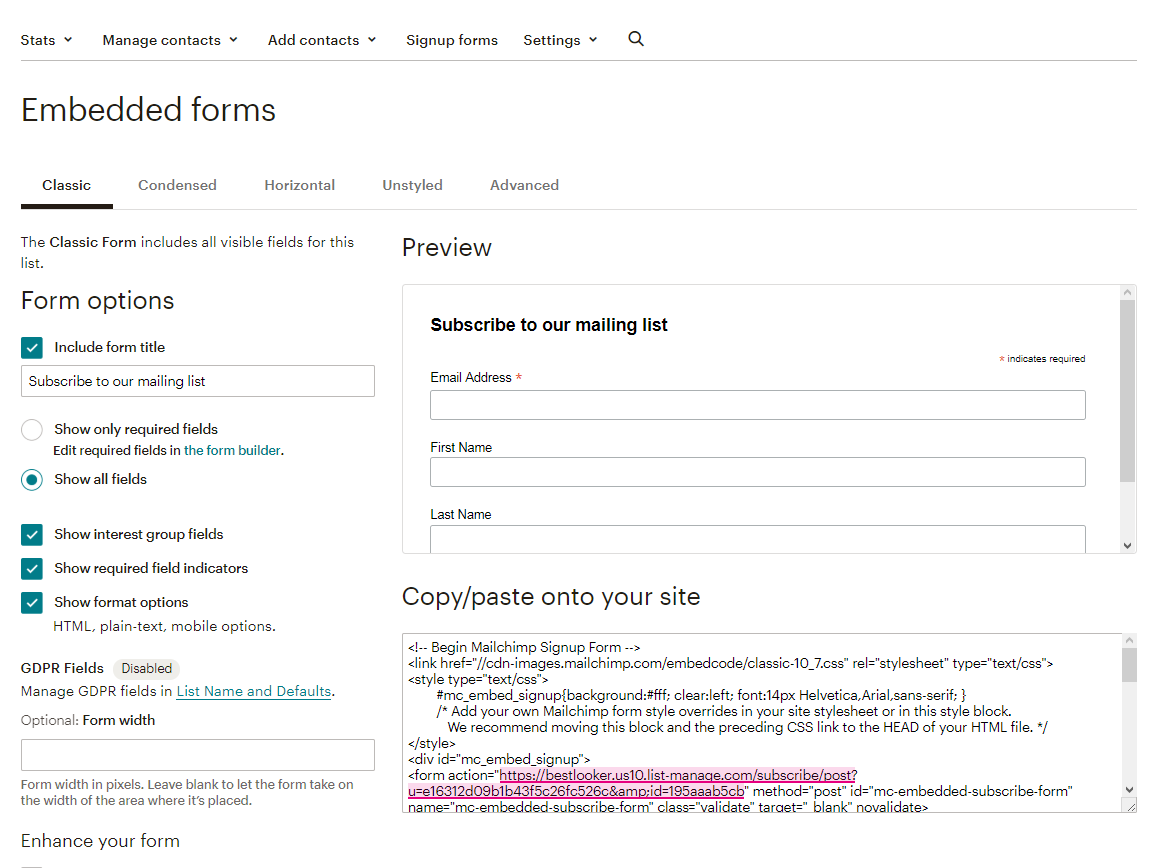
To configure the newsletter form, open file /js/jquery.ajaxchimp.min.js and replace Mailchimp form action URL with your Mailchimp list url (~line 9):
url: "http://bestlooker.us10.list-manage.com/subscribe/post?u=e16312d09b1b43f5c26fc526c&id=195aaab5cb" //Replace this with your own mailchimp post URL.
Use this instruction to get your own Mailchimp list URL:
- Sign into your Mailchimp account.
- Create new list.
- Go to: "Audience / Manage Audience / Signup Forms / Embedded forms" or "Lists / Your list / Signup Form / Embedded forms".
- Find the text field "Copy/paste into your site" and copy "action" attribute of the "form" tag (see screenshot).
Google Maps
Open your HTML file and replace this code of Google Maps embed with your own one:
Here you can find an instruction how to generate your own Google Maps code.
The Google Maps code looks like this:
Appear Animation
If you want to use appear animation for some element, you need to add class wow fadeIn to this element and set data attribute like this:
...
The full list of appear animation effects you can find in file main-elements-animation.html.
Icon Sets
You can use four different icons sets in Resonance template: Monoicons, Font Awesome Brands, Ionic Icons and Iconmonstr. Find an instruction on how to use each of these icon sets in the followinf files:
- main-elements-icons-monoicons.html
- main-elements-icons-brands.html
- main-elements-icons-Ionicons.html
- main-elements-icons-iconmonstr.html
FAQ
-
How to remove smooth scroll?
Open the file /js/plugins.js (line 140) and delete the following code fragment:/* --------------------------------------------- SmoothScroll.js --------------------------------------------- */ !function(){var e,t,o,n,r={frameRate:150,animationTime:500,stepSize:100,pulseAlgorithm:!0,pulseScale:4,pulseNormalize:1,accelerationDelta:50,accelerationMax:3,keyboardSupport:!0,arrowScroll:50,fixedBackground:!0,excluded:""},a=r,l=!1,i=!1,c={x:0,y:0},u=!1,s=document.documentElement,d=[],f=/^Mac/.test(navigator.platform),m={left:37,up:38,right:39,down:40,spacebar:32,pageup:33,pagedown:34,end:35,home:36},h={37:1,38:1,39:1,40:1};function w(){if(!u&&document.body){u=!0;var n=document.body,r=document.documentElement,c=window.innerHeight,d=n.scrollHeight;if(s=document.compatMode.indexOf("CSS")>=0?r:n,e=n,a.keyboardSupport&&A("keydown",S),top!=self)i=!0;else if(Z&&d>c&&(n.offsetHeight<=c||r.offsetHeight<=c)){var f,m=document.createElement("div");m.style.cssText="position:absolute; z-index:-10000; top:0; left:0; right:0; height:"+s.scrollHeight+"px",document.body.appendChild(m),o=function(){f||(f=setTimeout(function(){l||(m.style.height="0",m.style.height=s.scrollHeight+"px",f=null)},500))},setTimeout(o,10),A("resize",o);if((t=new q(o)).observe(n,{attributes:!0,childList:!0,characterData:!1}),s.offsetHeight<=c){var h=document.createElement("div");h.style.clear="both",n.appendChild(h)}}a.fixedBackground||l||(n.style.backgroundAttachment="scroll",r.style.backgroundAttachment="scroll")}}var p=[],v=!1,y=Date.now();function b(e,t,o){var n,r;if(n=(n=t)>0?1:-1,r=(r=o)>0?1:-1,(c.x!==n||c.y!==r)&&(c.x=n,c.y=r,p=[],y=0),1!=a.accelerationMax){var l=Date.now()-y;if(l
-
How to remove appear animation from page elements?
Find and delete the classappear-animateform<body>tag.
-
Why lightbox video doesn't work?
Ajax methods of jQuery are used for lightbox videos and they can work only on the real web server. For the correct operation of all functions, upload your website on a real server.
-
Why contact form may doesn’t work?
For the correct operation of contact form, the php support is necessary. Upload your website to a web server with support of PHP.
-
Why there are no images that were in live demo?
Envato forbids including demonstration images to template’s files. Please create a support request, and we will send you all the free images used in the Resonance template demo.
Credits
All the photos used in this template are intended only to illustrate the template and all the rights on them belong to their legal owners.
- jQuery
- jQuery Easing Plugin
- Bootstrap
- WOW.js
- Owl Carousel
- FitVids
- jQuery.localScroll
- jQuery.scrollTo
- mb.YTPlayer
- jQuery Parallax
- Isotope
- imagesLoaded
- Masonry
- Smooth Scroll
- jQuery.Viewport
- Magnific Popups
- lazyload
- Morphext
- jquery-ajaxchimp
- splitting.js
- Rellax JS
- Monoicons
- Iconmonstr
- Ionicons
- Fontawesome Brands
- https://coverr.co
- https://www.pexels.com
- https://unsplash.com.
- Icons8
- asylab.com
- ui8.net
- freeui.design
Support
If you have any questions feel free to contact us at this page - https://themeforest.net/item/resonance-html-onemulti-page-multipurpose-template/48140535/support.
© Bestlooker 2021